Several businesses on one account
Plan more than one business and switch between them.
The business selector
The name next to the logo is the business you have open. Click it to switch, create a new business or manage them.
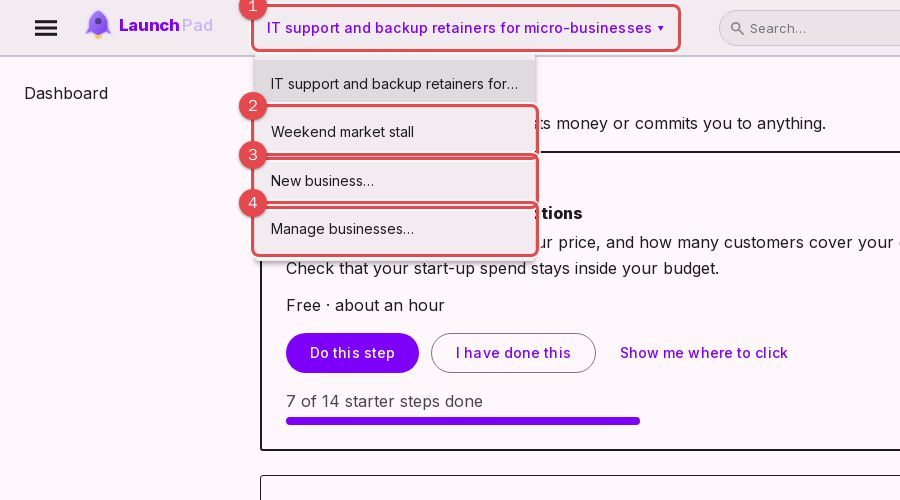
The selector shows the business you are working in.
Another business; choose it to switch.
New business: creates an empty one.
Manage businesses: rename or delete.
What is separate
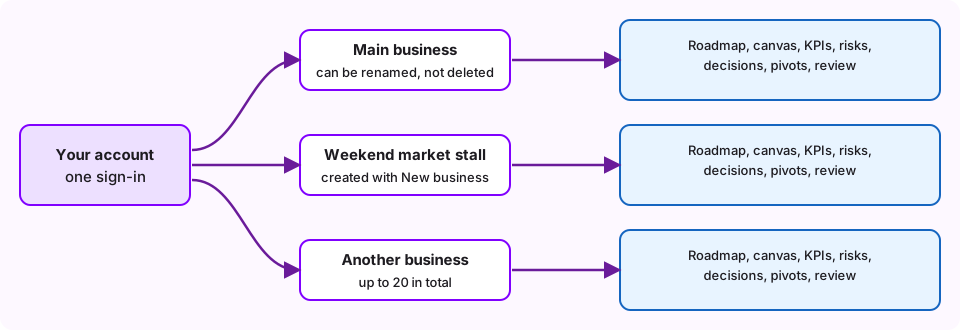
Each business has its own canvas, market research, pricing and other financials, KPIs, OKRs, PDCA cycles, risks, decisions, scoping, weekly reviews, roadmap progress, startup stage and its own Xero or Zelt connection. Points, badges and your profile belong to you and are shared.
Creating one
Choose New business, give it a name and Create. It opens empty and ready to fill in. You can have as many as you like, and names must be different (capital letters do not count).
Renaming and deleting
Open Manage businesses to rename any business. Deleting a business removes everything planned in it for good, so you are asked to confirm. You can delete any of your businesses.
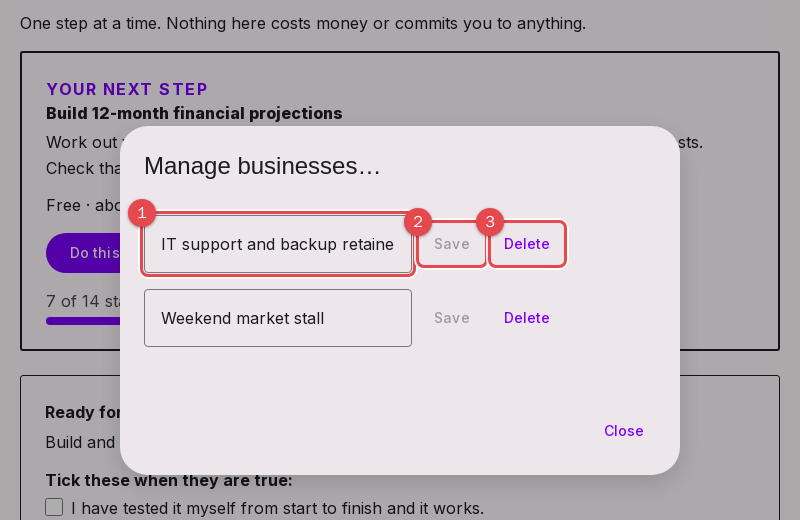
Name: type a new name.
Save: keeps the new name.
Delete: removes that business and its data, after you confirm.
Deleting your last business
You always have at least one business to work in. If you delete the last one, a new empty business called My business is created so the tools have somewhere to save. Rename it to whatever you like.